
Why does Amazon keep rejecting my brand or category approval application?
Short answer
Read the exact approval request for the product, brand, category and marketplace before buying stock or resubmitting documents. Check genuine supplier evidence, seller-entity details and any requested authorisation. Requirements can vary, and a wholesale invoice is not an approval guarantee. Keep documents unaltered and address the actual rejection reason through the stated application route.
Facts checked 3 min read
Also asked as
- What invoice evidence does Amazon need for ungating?
- Does buying from a wholesaler guarantee brand approval?
- Is brand approval the same as Amazon Brand Registry?
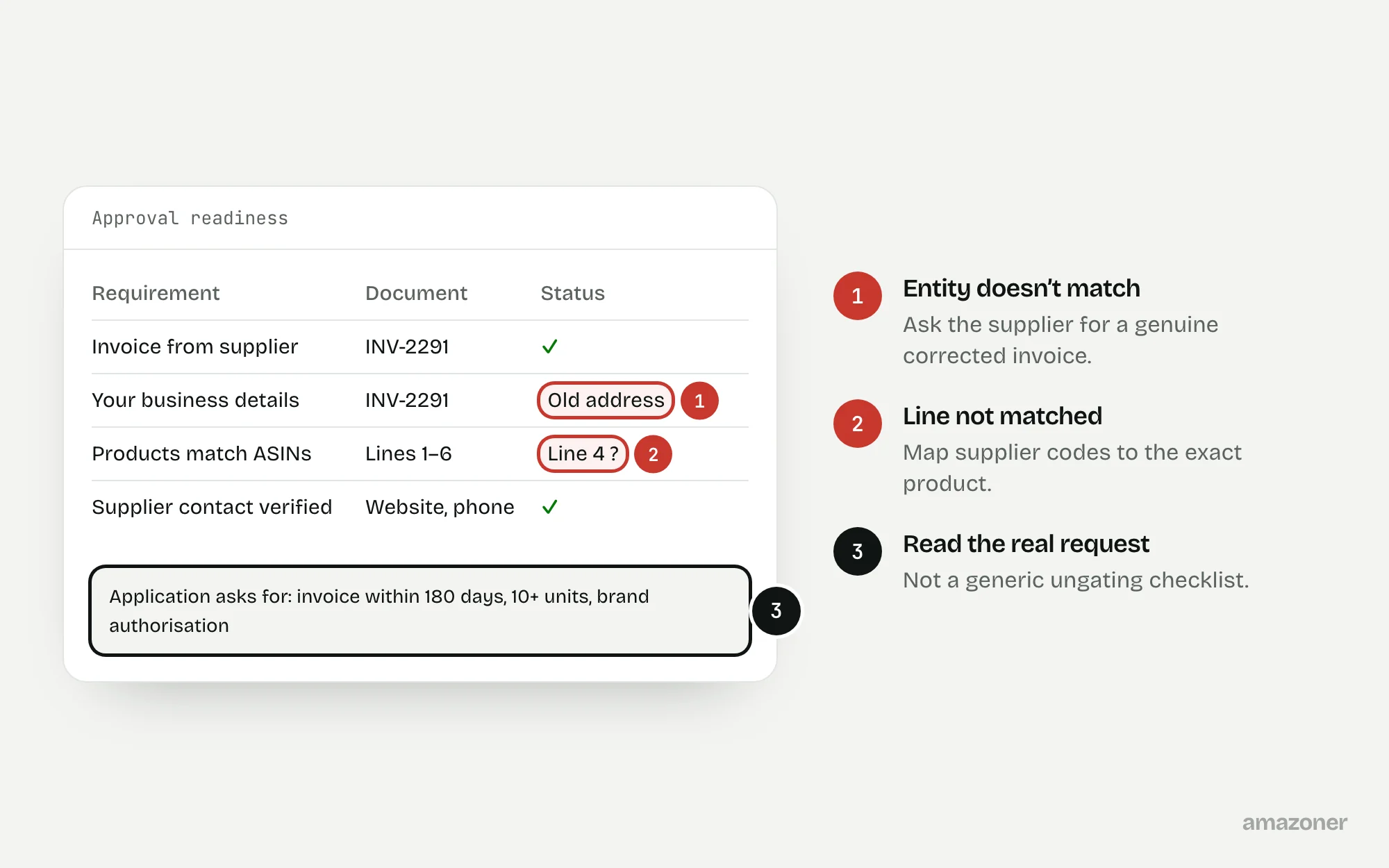
A typical case
A UK wholesale personal-care seller
Stock is bought on the strength of a generic ungating checklist. The application is declined, and the team resubmits the same invoice under different filenames. The supplier’s descriptions are hard to link to the intended ASINs, and the invoice shows an old trading address.
Don’t confuse these
- Selling approval
- Amazon’s permission to sell a restricted product, brand or category (often called ungating).
- Brand Registry
- Enrolment for brand owners, giving tools to protect a brand. It isn’t permission for resellers.
- Letter of authorisation
- A brand’s written permission to sell, sometimes requested as extra evidence.
Approval can apply to a product, brand, category or other level, and approval in one context doesn’t necessarily carry over to another marketplace or account.
Requirements for invoice age, quantity, suppliers, authorisation and other documents must come from the actual application. A third-party “guaranteed ungating” promise isn’t Amazon’s decision.
Why it happens
Applications fail when documents don’t meet the stated criteria, can’t be verified, name a different legal entity or don’t clearly identify the products. A quotation or pro forma can be mistaken for proof of purchase.
Genuine documents can also contain clerical errors or lack the detail needed to match supplier codes to Amazon listings. Resubmitting doesn’t fix those gaps.
How to diagnose it
- 1
Check the exact restriction
In Add Products, check the specific ASIN and marketplace, and whether the restriction is on the brand, category or product.
- 2
Read the application’s requests
Save the rejection reason, response route and outstanding criteria from View Selling Applications, and build a checklist from them.
- 3
Match the invoice to the account
Compare the invoice’s entity and address with the seller account. Ask the supplier for a genuine corrected document if there’s an error.
- 4
Map invoice lines to products
Link each line to the intended product by brand, model, pack quantity and identifiers, with supplier clarification where needed.
- 5
Check the current requirements
Confirm the application’s invoice-date, quantity, file and supplier rules, and any authorisation it asks for.
- 6
Respond to the gaps only
Prepare a truthful response for seller review through the stated route, or pause the purchase if the criteria can’t be met.
What we recommend
Produce an approval-readiness matrix for the product, an index of original documents and a list of supplier questions. Fix genuine document errors through the issuer and address only the criteria actually requested.
Keep any resubmission under seller approval, and never disguise files, falsify authorisation or advise getting around the account rules. Where supplier acceptability remains uncertain, say so before more money is committed.
Common mistakes
- Assuming any wholesale invoice satisfies the application.
- Editing invoice text or cropping out details.
- Confusing Brand Registry with permission to sell a brand.
- Buying stock on a generic quantity rule or a guaranteed-ungating offer.
Prevention checklist
- Check the exact product and marketplace request before buying stock.
- Keep seller entity details accurate everywhere.
- Keep original supplier documents.
- Maintain a map from supplier codes to products and identifiers.
- Track decisions and gaps instead of resubmitting unchanged files.
What an audit gives you
Application requirements mapped to original documents, seller-detail discrepancies identified, and supplier clarification requests drafted.
Related questions
Does a wholesaler invoice guarantee ungating?
No. It may be relevant evidence, but Amazon applies its own criteria and document checks.
Can I fix an invoice error myself?
No. Ask the issuer for a genuine corrected original and keep a record of the correction.
Is Brand Registry the same as permission to sell a brand?
No. Brand Registry is for brand owners. A reseller’s rights and Amazon’s selling approval are separate questions.
Should I buy the requested quantity before checking eligibility?
Check the actual request and the supplier risk first. Don’t rely on a universal quantity or invoice-age rule.
Sources
The seller questions and Amazon or regulator guidance this guide is based on, checked 7 November 2026.
- Product Approval Challenges? What You Need to Know (Amazon seller forums)
- Invoice Rejected as “Altered” Even Though Submitted As-Is (Amazon seller forums)
- How does ungating work? (r/AmazonSeller)
General guidance, not legal, tax or account-specific advice. Amazon’s rules, menus and programmes change; check the current version in your own account before acting.