
Why is my Amazon listing not indexing for keywords?
Short answer
An Amazon product missing for a keyword may have a relevance, catalogue, suppression or ranking problem; these are not the same diagnosis. Check listing status, product classification, accurate searchable content and accepted backend terms. Compare repeated marketplace-specific observations with account reports where available. A single search or third-party checker is not conclusive.
Facts checked 3 min read
Also asked as
- Why is my ASIN missing from Amazon search?
- Why are backend search terms not indexing?
- Is poor keyword ranking the same as not indexing?
A typical case
A gardening-tool brand
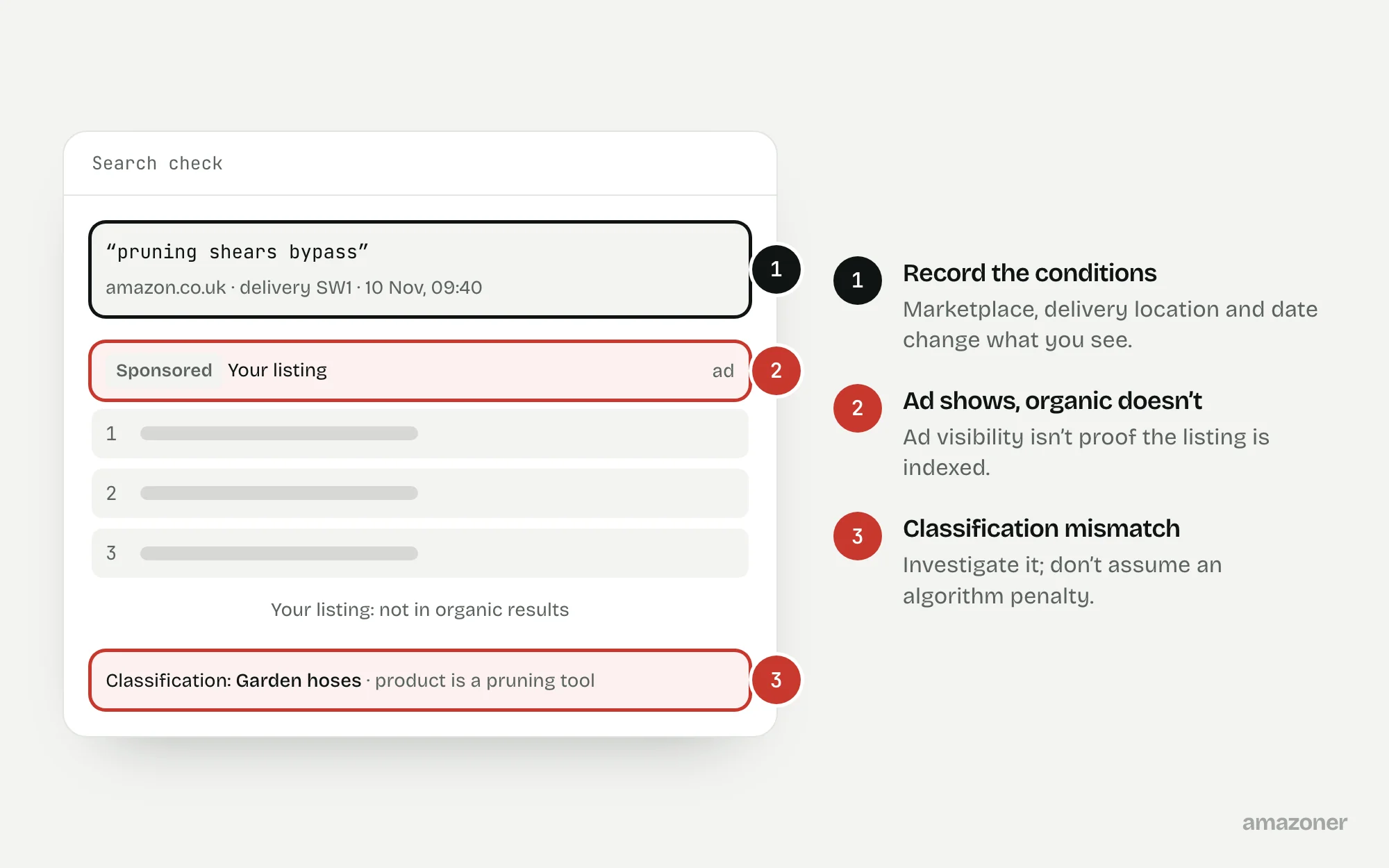
A child ASIN that used to be found for its core terms stops appearing after a catalogue upload, while its ads still show. The upload has left a disputed product classification and inconsistent accepted keyword contributions, so the ad activity says nothing about organic discoverability.
Don’t confuse these
- Indexed
- Eligible to be returned for a search term.
- Ranking
- Where the listing appears for that term, among everything else that’s indexed.
- Suppressed
- Hidden from search altogether because of a listing problem, whatever the keywords.
Indexing describes inclusion or eligibility for retrieval; ranking describes position for a query. Customer location, marketplace, availability and changing results all affect what you see.
An “ASIN plus keyword” search is a troubleshooting signal, not an authoritative pass or fail test of every indexed term. Third-party tools may disagree with each other and with Amazon.
Why it happens
Amazon decides relevance from the listing’s accepted content and classification. If an upload changes the product type or browse classification, or a field isn’t accepted, terms the listing used to match can stop working.
Search-term fields have limits, and content that breaks the rules may not be used. Results also vary by marketplace, delivery location and stock, so one search from one place can mislead.
How to diagnose it
- 1
Rule out suppression and stock
Confirm the listing isn’t search suppressed and has a buyable offer before looking at keywords at all.
- 2
Check the classification
Compare the current product type and browse classification with what the product really is. A wrong classification can move it out of relevant searches.
- 3
Read the upload processing reports
Find out which values Amazon actually accepted from the last upload, not just what was submitted.
- 4
Review the searchable fields
Check the title, bullets and backend search terms for accuracy, current field limits, and irrelevant or prohibited terms.
- 5
Recheck with a fixed query set
Use the same queries, marketplace and delivery location each time, and record the date. Compare with account reports where available.
- 6
Escalate with evidence
If a classification or visibility discrepancy can’t be explained, raise it with the exact listing, queries and processing evidence.
What we recommend
Rule out suppression and unavailable offers first; compare the current product type and browse classification with the real product; inspect upload processing reports and accepted keyword fields.
Remove irrelevant or prohibited terms and follow the current marketplace field limits without keyword stuffing. Recheck a consistent query set and escalate unexplained classification or visibility discrepancies with evidence.
Common mistakes
- Treating ad impressions as proof that the listing is organically indexed.
- Relying on a single “ASIN plus keyword” search or one third-party tool.
- Repeating keywords to force indexing, which wastes space and can break the rules.
- Calling it an algorithm penalty before checking classification and accepted data.
Prevention checklist
- Read processing reports after every catalogue upload.
- Keep a record of each product’s intended product type and classification.
- Maintain a fixed set of test queries for each important product.
- Stay within the current field limits for each marketplace.
- Record the marketplace, delivery location and date with every visibility check.
What an audit gives you
A classification and accepted-content check for the affected ASINs, a list of corrections, and a repeatable visibility baseline to measure against after changes.
Related questions
Is not ranking the same as not indexing?
No. An indexed listing can still rank too low to find. Indexing is whether it can appear for a term; ranking is where it appears.
Do backend search terms always get indexed?
Not necessarily. Content over the field limit or against the rules may not be used. Check the current limits for the marketplace and keep terms relevant.
Is an “ASIN plus keyword” search a reliable test?
It’s a useful signal, not proof. Results depend on marketplace, location and availability, so repeat checks under the same conditions before drawing conclusions.
Sources
The seller questions and Amazon or regulator guidance this guide is based on, checked 7 November 2026.
- ASIN stopped indexing completely (r/FulfillmentByAmazon)
- Keywords are not indexing (r/FulfillmentByAmazon)
- Backend keywords not indexing (r/FulfillmentByAmazon)
General guidance, not legal, tax or account-specific advice. Amazon’s rules, menus and programmes change; check the current version in your own account before acting.