
Why did my Amazon reviews disappear after adding a variation?
Short answer
Reviews may stop appearing across Amazon variations when relationships change or the products do not qualify for review sharing. Amazon’s 2026 update limits sharing to eligible minor differences that do not affect functionality. Audit the variation theme, product differences and child attributes; never combine unrelated products simply to pool reviews.
Facts checked 3 min read
Also asked as
- Why are reviews not sharing across child ASINs?
- Does merging Amazon variations combine reviews?
- How do I check variation review-sharing eligibility?
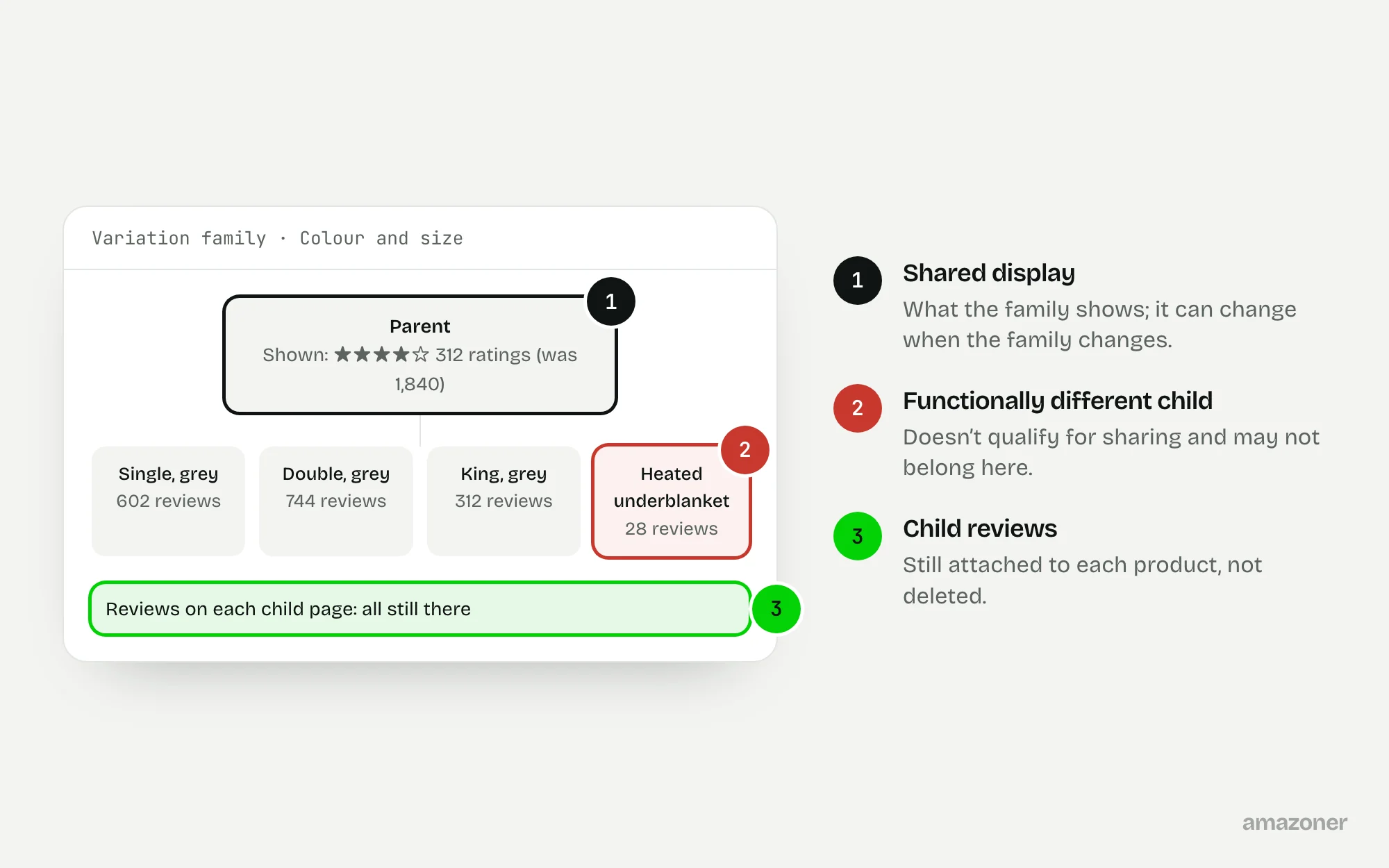
A typical case
A bedding brand
A materially different product is added to an existing colour-and-size family, and the displayed review totals become inconsistent. The team assumes reviews have been deleted. The first job is to separate reviews attached to individual child products from reviews that were displayed through sharing across the family.
Don’t confuse these
- Child reviews
- Reviews written on one specific child product.
- Shared display
- Reviews shown across a variation family, where Amazon allows sharing.
- Deleted reviews
- Reviews actually removed. A lower displayed count alone doesn’t show this.
A lower displayed count doesn’t establish that the underlying reviews were deleted.
Amazon announced a category-by-category review-sharing change running from February to May 2026. It includes eligible size and pack-quantity differences, subject to the applicable rules, so don’t assume all pack variations are excluded or that all same-brand products qualify.
Why it happens
Amazon decides which reviews display across a family based on the relationship and on whether the products qualify for review sharing. Adding a product that works differently, changing the variation theme, or breaking and rebuilding a family can all change what displays.
Since the 2026 change, sharing is limited to eligible minor differences that don’t affect how the product works, introduced category by category. Families built under the old rules can display differently now.
How to diagnose it
- 1
Export the family
Download the current parent and child structure and the variation theme for each marketplace.
- 2
Compare it with the real products
Mark any child that differs in function, not just in size, colour or pack quantity.
- 3
Separate child reviews from shared display
Record the review count on each child page and what the family shows, before and after any change.
- 4
Check current sharing eligibility
Read Amazon’s current review-sharing guidance, and use the eligibility check in Seller Assistant where it’s available.
- 5
Correct only invalid relationships
Fix relationships that don’t fit the permitted theme for the category, using accurate product data.
- 6
Escalate what’s left
Ask support to investigate unresolved inconsistencies, with the child-level before and after records.
What we recommend
Export the current family structure and compare it with the physical products and the permitted category theme; identify functionally different items and invalid relationships; review current review-sharing guidance before submitting accurate corrections.
Keep before-and-after child-level observations and ask support to investigate unresolved inconsistencies. Don’t promise review recovery or manipulate families to inflate social proof.
Common mistakes
- Assuming reviews were deleted because the displayed total dropped.
- Adding unrelated products to a family to pool their reviews, which breaks Amazon’s rules.
- Breaking and rebuilding families repeatedly in the hope the old count returns.
- Promising that reviews will be recovered.
Prevention checklist
- Check review-sharing eligibility before adding a new child.
- Keep a documented map of every variation family.
- Record child-level review counts before any structural change.
- Review Amazon’s guidance when category rules change.
- Keep products that work differently in their own listings.
What an audit gives you
A corrected variation map that reflects the actual product range, with review-sharing eligibility documented for each family that stays together.
Related questions
Were my reviews deleted?
Not necessarily. A lower displayed total often reflects a change in what’s shared across the family. Check each child page’s own reviews before assuming deletion.
Can I add products to a variation to combine their reviews?
No. Variations are for genuine versions of the same product. Combining unrelated products to pool reviews breaks Amazon’s rules.
Do size and pack variations still share reviews?
Amazon’s 2026 announcement includes eligible size and pack-quantity differences, subject to the rules for the category. Check the current guidance for your products.
Sources
The seller questions and Amazon or regulator guidance this guide is based on, checked 7 November 2026.
- Amazon reviews disappeared after adding a variation (Amazon seller forums)
- Changes to review sharing across product variations starting from Feb 12 (Amazon seller forums)
- Check review sharing eligibility with Seller Assistant (Amazon seller forums)
General guidance, not legal, tax or account-specific advice. Amazon’s rules, menus and programmes change; check the current version in your own account before acting.