
Why has my Amazon FBA capacity limit fallen despite a healthy IPI score?
Short answer
Your IPI score is not the only input to FBA capacity. Sales performance, forecasts and available fulfilment-centre space can also matter. Review Capacity Monitor by storage type and month, including open shipments, before ordering more stock. Compare excess inventory and inbound commitments, then assess any eligible Capacity Manager request and its costs.
Facts checked 3 min read
Also asked as
- How does Amazon calculate FBA capacity limits?
- Do open shipments count towards FBA capacity?
- Should I request more space through Capacity Manager?
A typical case
A seasonal outdoor-accessory brand
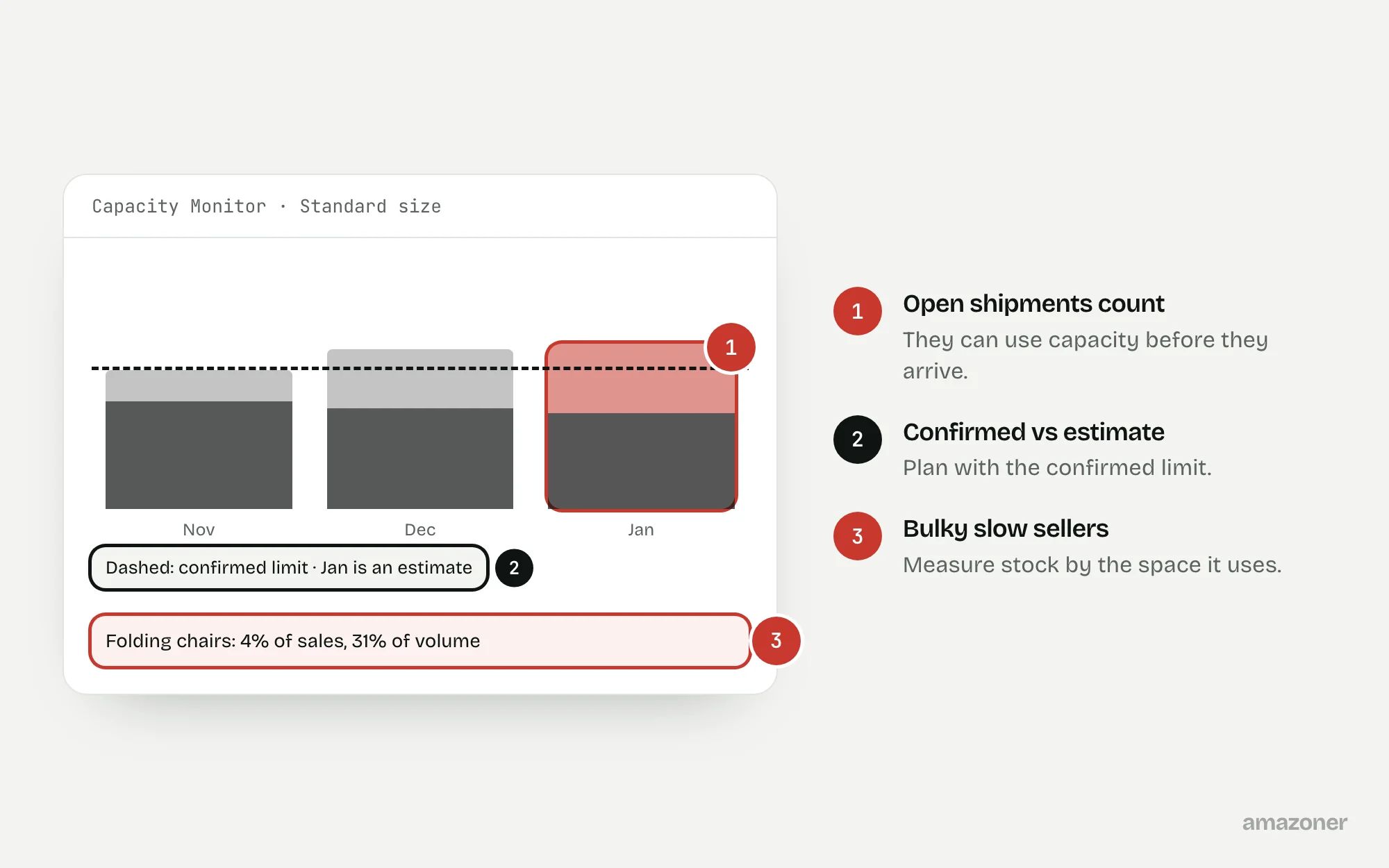
A seasonal replenishment is planned on an earlier capacity estimate, because the IPI score looks healthy. Meanwhile, slow-moving bulky products take a large share of the storage type, and open shipment plans reserve more. The risk is a mismatch between purchasing, physical volume and the month shipments are due, not a fault in the score.
Don’t confuse these
- IPI score
- Amazon’s measure of how efficiently you manage FBA inventory.
- Capacity limit
- The space you can use per storage type, shown in Capacity Monitor.
- Storage fees
- Charges for stock held, including aged-inventory surcharges, which are separate from capacity.
IPI, capacity limits and storage charges measure related but different things. An improved score doesn’t guarantee a higher allocation, and a future estimate isn’t a confirmed limit.
Capacity is assessed by storage type using the units shown in the account, and open shipments may count towards usage before goods arrive. Don’t apply an old quarterly restock-limit explanation to the current monthly view.
Why it happens
Replenishment plans often work in units or revenue, while capacity depends on packaged volume and storage type. A light but bulky product can use space out of proportion to its sales.
Long lead times, optimistic seasonal forecasts and duplicate or abandoned shipment plans add to the problem, and limits can fall because Amazon’s network has less space. The useful split is between what you control, stock mix and shipment planning, and what you don’t.
How to diagnose it
- 1
Read Capacity Monitor
For the relevant storage type and period, record current usage, confirmed limit and future estimates separately, with the unit and date.
- 2
Review the IPI components
Use the Inventory Performance dashboard to find efficiency issues, not as a calculator that guarantees an allocation.
- 3
Find space-hungry slow stock
Use stock age, excess and sell-through data, converted to volume, to find products using space without a credible demand plan.
- 4
Reconcile open shipments
Match shipments in the shipping queue with Capacity Monitor and find abandoned or overlapping plans. Don’t cancel shipments already moving just to change a dashboard.
- 5
Model the fees
Compare keeping, returning or selling down slow stock, including storage fees, surcharges and margin.
- 6
Price extra capacity
Where available, check Capacity Manager eligibility and terms, and compare its cost with a revised inbound plan or external storage.
What we recommend
Build an inbound plan for each storage type using verified packaged volume, available capacity and a conservative demand forecast; flag slow-moving stock for a commercial decision; reconcile genuinely obsolete shipment records.
Treat any request for extra capacity as a paid commitment with uncertain acceptance, not a guaranteed result of a better IPI. Keep disposal, liquidation, removal and purchasing decisions separate from the evidence-gathering stage.
Common mistakes
- Assuming a strong IPI guarantees space, or that every future estimate is binding.
- Planning in units and ignoring packaged volume, storage type and arrival month.
- Forgetting that open shipments can use capacity before they arrive.
- Removing profitable fast sellers or buying capacity without modelling the cost.
Prevention checklist
- Keep a volume-based forecast alongside the unit-based purchase plan.
- Review confirmed limits and estimates separately before buying stock.
- Give every open shipment an owner, an arrival date and a purpose.
- Review slow-moving stock by the space it uses.
- Judge capacity bids, removals and external storage on total cost.
What an audit gives you
Inbound commitments reconciled by storage type, a phased replenishment plan, and the cost of any extra capacity shown separately.
Related questions
Does a higher IPI always mean a higher capacity limit?
No. Amazon describes other inputs too, including sales performance and network capacity. Plan with the allocation shown in the account.
Do open shipments use capacity before they arrive?
They can count towards usage. Reconcile the account’s current calculation with your shipment records.
Are capacity charges the same as storage fees?
No. Storage fees, aged-inventory surcharges and capacity reservation costs have different bases and conditions.
Should I remove stock as soon as capacity falls?
Not automatically. Compare demand, contribution, removal costs and inbound timing first. Removals and disposals need a deliberate decision.
Sources
The seller questions and Amazon or regulator guidance this guide is based on, checked 7 November 2026.
- Refresher: FBA Capacity Limits & How They Work (Amazon seller forums)
- Capacity Monitor questions (r/FulfillmentByAmazon)
- Inventory Performance Index (IPI) Decreasing Every Week (Amazon seller forums)
- FBA Capacity Limits Jan 2026 (Amazon seller forums)
General guidance, not legal, tax or account-specific advice. Amazon’s rules, menus and programmes change; check the current version in your own account before acting.