
Why is my Amazon FBA inventory stranded?
Short answer
Stranded FBA inventory is stock without an associated active offer, so it cannot currently be sold through that listing. Inspect the reason shown in Fix Stranded Inventory and reconcile the SKU, ASIN and offer status. Resolve the underlying listing or eligibility issue, then confirm buyability; stock recorded as available is not enough.
Facts checked 3 min read
Also asked as
- How do I fix stranded inventory on Amazon?
- Why is FBA stock available but my listing out of stock?
- Can a missing SKU strand FBA inventory?
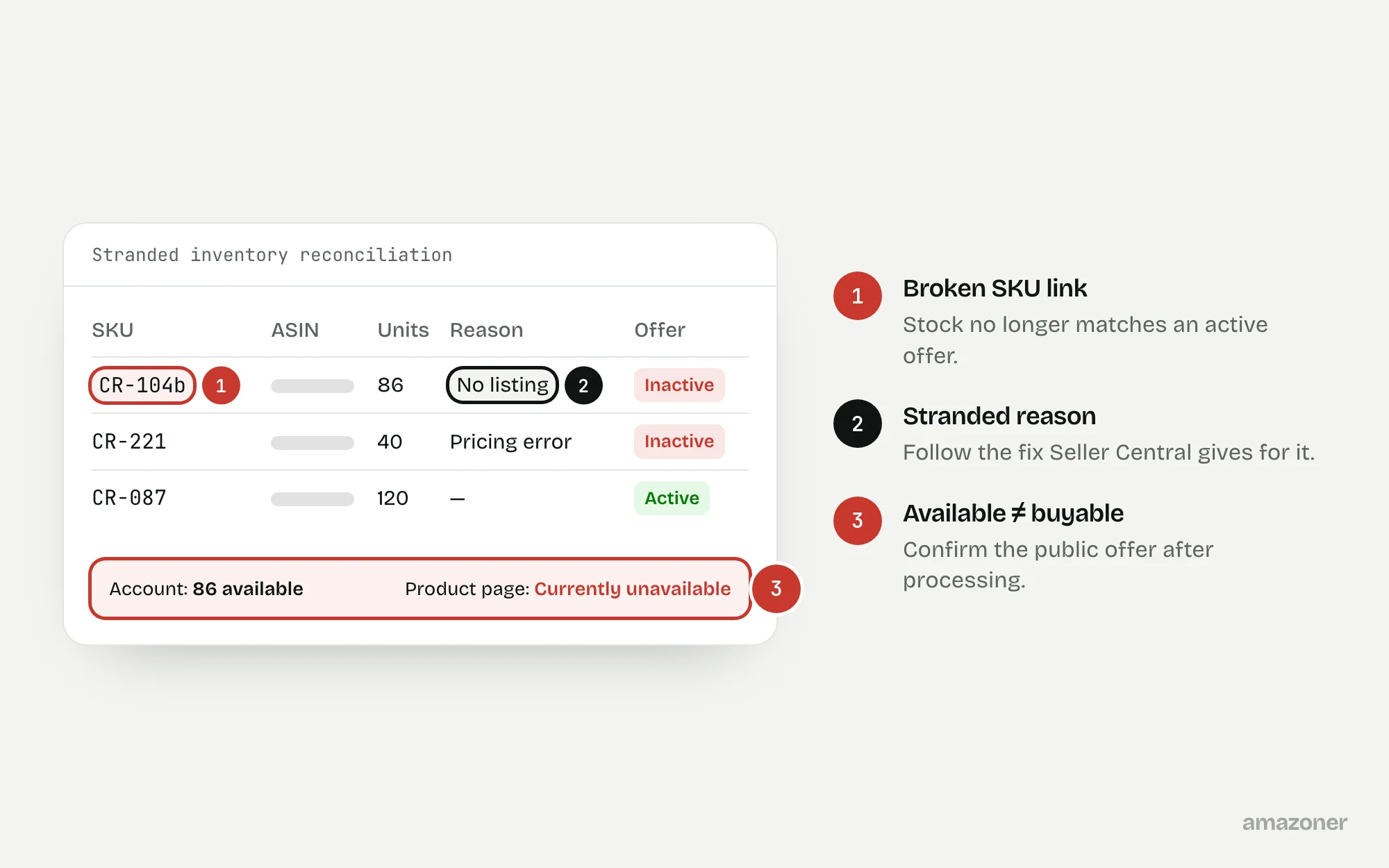
A typical case
A craft-supply seller
Stock is visible in the warehouse but customers can’t buy the products. A listing change has left inconsistent SKU-to-ASIN records and inactive offers. The reason the stock is stranded needs establishing before anyone creates replacement listings or sends more stock.
Don’t confuse these
- Stranded
- In an FBA warehouse but with no active offer, so it can’t sell.
- Reserved
- Set aside for customer orders, transfers between warehouses or processing.
- Unfulfillable
- Can’t be sold, for example because it’s damaged or expired.
Stranded, reserved, inbound and unfulfillable inventory are different states that need different investigations. An account-side available quantity isn’t proof of a live customer offer.
Removal deadlines and automatic-action settings are account-specific. Check the current notice rather than relying on a generic grace period.
Why it happens
Stock becomes stranded when the offer it belongs to stops being active: a listing closed or deleted, a SKU changed so it no longer matches, a pricing error, a listing blocked for compliance, or a product that now needs approval.
The stock stays in the warehouse, so it looks available in some reports while no customer can buy it.
How to diagnose it
- 1
Download the stranded detail
Export the stranded inventory report from Fix Stranded Inventory, with the reason shown for each SKU.
- 2
Reconcile SKU, ASIN and offer
Match each stranded SKU to its ASIN and offer status in Manage All Inventory and the fulfilment reports.
- 3
Apply the reason-specific fix
Follow the correction Seller Central gives for each stranded reason.
- 4
Check approval and settings first
Verify listing approval and fulfilment settings before making any structural change to the listing.
- 5
Note any removal deadline
Read the current notice for removal dates and automatic actions on the account.
- 6
Recheck after processing
Confirm both the account-side association and the public offer once changes have processed.
What we recommend
Download the stranded-inventory detail and reconcile it with Manage All Inventory and fulfilment reports; follow the reason-specific correction shown in Seller Central; verify listing approval and fulfilment settings before making structural changes.
Avoid deleting live records as a routine fix. Review any removal deadlines with the seller and recheck both the account association and the public offer after processing.
Common mistakes
- Deleting and recreating listings as a first response.
- Sending more stock before the stranded cause is fixed.
- Relying on a generic grace period instead of the account’s own notice.
- Treating an available quantity as proof of a live offer.
Prevention checklist
- Review stranded inventory weekly and after listing changes.
- Don’t change SKUs on stock that’s already in FBA.
- Keep an up-to-date SKU-to-ASIN map.
- Check stranded stock after changing pricing rules.
- Track removal deadlines from the account notices.
What an audit gives you
A reconciliation of every stranded SKU against its ASIN and offer status, with the fix for each reason and an offer-reactivation log.
Related questions
Will Amazon remove stranded stock automatically?
It can, depending on the account’s settings and the notice. Check the current deadline and automatic actions for your account.
Can I create a new listing for stranded stock?
Usually that’s the wrong fix. Resolve the reason the existing offer is inactive, so the stock stays linked to the right product.
Why does stock show as available while the listing is out of stock?
Stock can be counted in the warehouse while its offer isn’t active. Check the stranded report and the offer status for that SKU.
Sources
The seller questions and Amazon or regulator guidance this guide is based on, checked 7 November 2026.
- Stock Going into Stranded (Amazon seller forums)
- FBA Stock Showing As Available But Also Showing as Out of Stock (Amazon seller forums)
- Inventory listing missing: Missing SKU (Amazon seller forums)
General guidance, not legal, tax or account-specific advice. Amazon’s rules, menus and programmes change; check the current version in your own account before acting.