
Why did I lose the Amazon Buy Box?
Short answer
Losing the Amazon Buy Box, now called the Featured Offer, can reflect offer eligibility, competing offers, pricing, delivery or seller-performance factors. Check whether another offer is featured or the page has no Featured Offer at all. Review Pricing Health, fulfilment and account metrics; a healthy account does not guarantee selection.
Facts checked 3 min read
Also asked as
- Why is my offer not the Featured Offer?
- Why has the Buy Box disappeared from my listing?
- Does a healthy account guarantee Buy Box eligibility?
A typical case
A home-storage seller
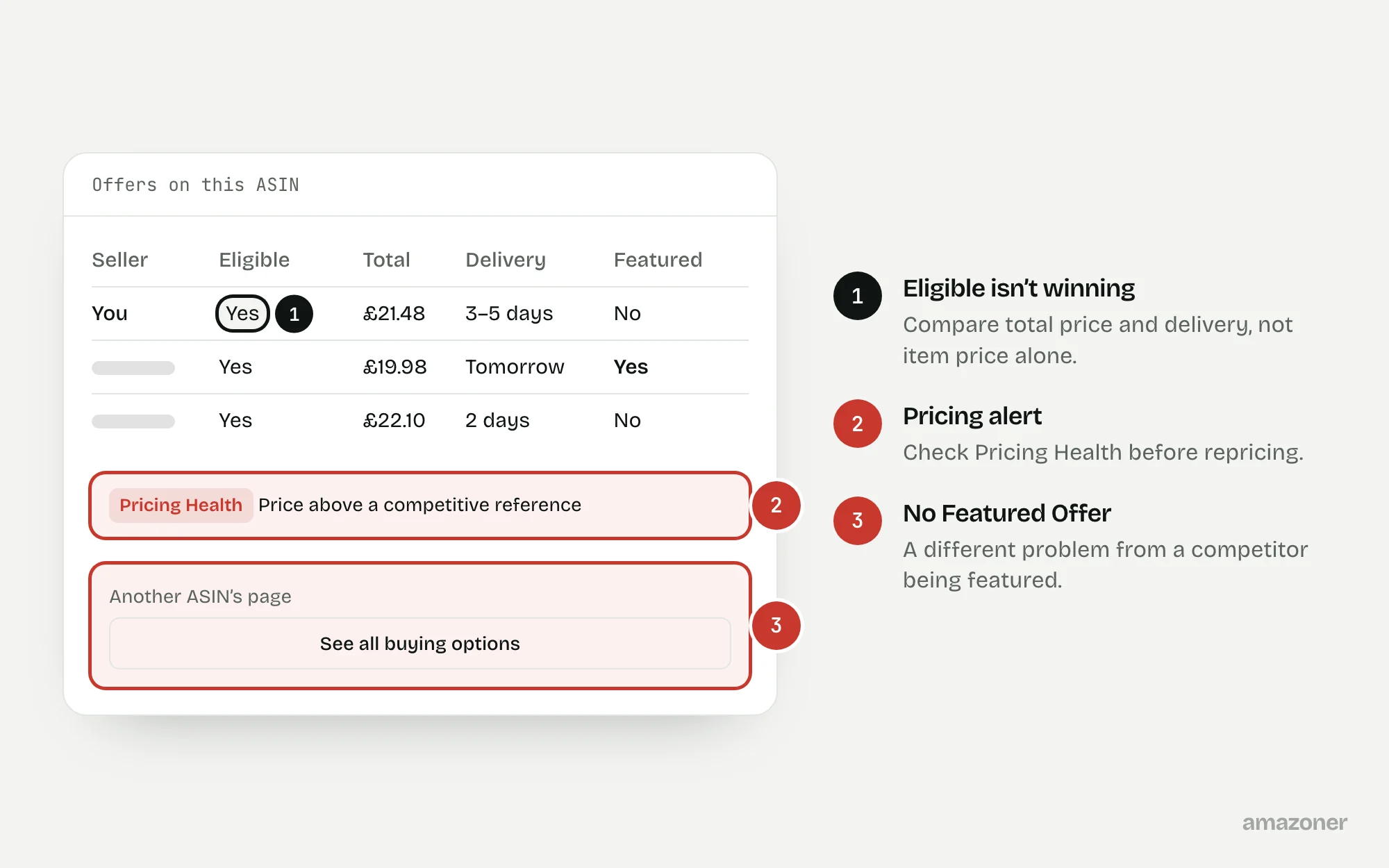
Featured Offer visibility drops suddenly while the Account Health dashboard looks healthy. On some pages a competing seller is featured; on others there’s no Featured Offer at all. Pricing alerts and delivery promises need reviewing before anyone assumes the whole account is blocked.
Don’t confuse these
- Featured Offer eligibility
- Whether your offer can be considered at all, based on account and offer criteria.
- Winning the Featured Offer
- Being selected among eligible offers, at a particular time and for a particular delivery location.
- No Featured Offer
- The page features no offer, often because of a pricing concern. Shoppers see an option to view all buying options instead.
Eligibility and winning the Featured Offer aren’t interchangeable. A public-page check is specific to its marketplace, delivery destination and time.
Using FBA or having the lowest item price doesn’t guarantee selection. Compare the total customer price and the actual offer conditions.
Why it happens
Amazon selects the Featured Offer from eligible offers using factors such as total price including delivery, delivery speed, stock and seller performance. A change by a competitor, a slower delivery promise or a stock gap can each change the result.
The page can also show no Featured Offer at all when Amazon judges the price uncompetitive, including against prices it finds elsewhere. So a healthy account on its own doesn’t explain what happened.
How to diagnose it
- 1
Separate the two situations
For each ASIN, record whether another offer is featured or none is, with the marketplace, delivery location and time.
- 2
Check eligibility
Review the account-side Featured Offer eligibility indicators for each affected offer.
- 3
Review Pricing Health
Look for uncompetitive-price alerts and the reference prices Amazon is comparing against.
- 4
Compare offers like for like
Compare total customer price including delivery, the delivery promise, fulfilment method and condition.
- 5
Check stock and performance
Verify stock levels, fulfilment settings and any performance alerts.
- 6
Challenge only what’s wrong
If a price reference is demonstrably incorrect, raise it through the appropriate support route with product-matching evidence.
What we recommend
Check the account-side Featured Offer eligibility indicators and Pricing Health; compare equivalent offers including delivery; verify stock, fulfilment settings and performance alerts.
Challenge a demonstrably incorrect price reference through the appropriate support route with product-matching evidence. Assess margin before repricing, and record observations without promising Buy Box control.
Common mistakes
- Assuming FBA or the lowest item price guarantees the Featured Offer.
- Repricing to the floor without checking the margin left.
- Treating one observation from one location as true for the whole account.
- Promising anyone that the Featured Offer can be controlled.
Prevention checklist
- Review Pricing Health alerts regularly.
- Keep delivery promises realistic and stock continuous.
- Compare total price including delivery, not item price alone.
- Log Featured Offer checks with time and delivery location.
- Check the margin impact before changing repricing rules.
What an audit gives you
An offer-by-offer record separating eligibility, pricing and competition, with pricing discrepancies documented and corrective actions in priority order.
Related questions
Is the Buy Box the same as the Featured Offer?
Yes. Amazon now calls the Buy Box the Featured Offer.
Does using FBA guarantee the Featured Offer?
No. FBA can help with delivery promises, but selection depends on several factors, including total price and competing offers.
Why does my page show no Featured Offer?
It often points to a pricing concern. Check Pricing Health for alerts and compare your total price, including delivery, with the reference Amazon is using.
Sources
The seller questions and Amazon or regulator guidance this guide is based on, checked 7 November 2026.
- LOST BUYBOX NO REASON (Amazon seller forums)
- Amazon Suppressing Featured Offer Due to Unrealistic “Competitive Price Outside Amazon” (Amazon seller forums)
General guidance, not legal, tax or account-specific advice. Amazon’s rules, menus and programmes change; check the current version in your own account before acting.